 Michael Caine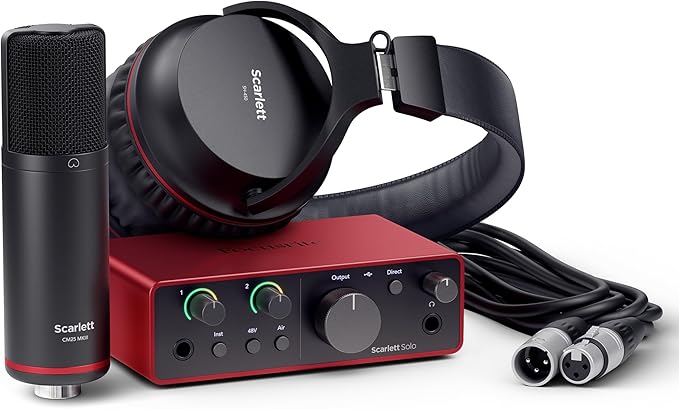
A recording deal only matters when the gear inside the box solves a real problem. The Focusrite Scarlett Solo is drawing fresh attention in the U.S. because the Solo Studio bundle has been showing at $229.99 at major retailers, down from the usual $279.99 listing, with the interface, CM25 MkIII condenser mic, SH-450 headphones, and XLR cable included. That puts pressure on the usual beginner choice: buy one piece at a time, or grab a ready-made audio interface bundle and start recording this week.
For singers, guitar players, podcasters, and bedroom producers, the appeal is simple. You get a compact USB audio interface with one mic preamp, one instrument input, Air modes, loopback, 24-bit/192kHz conversion, and USB-C connection support. That does not make it the right pick for everyone. It does make the current bundle harder to ignore for anyone building a home recording setup on a tight budget, especially when separate mic, cable, and headphone costs can sneak up fast.
Why Focusrite Scarlett Solo Looks Stronger When the Bundle Price Drops
The Solo has always been easy to understand: one voice, one guitar, one small desk, one laptop. That narrow focus is the whole point. Some buyers see the single mic input and think it is limited. In practice, that limit can help a new creator record more and shop less.
The friction starts when you price the extras. A beginner often buys an interface, then realizes a mic needs an XLR cable, closed-back headphones help while tracking, and software still needs to enter the picture. The official Solo Studio package includes the interface, CM25 MkIII condenser microphone, SH-450 headphones, an XLR cable, and recording software access. At a lower sale price, the math shifts from “starter kit” to “less waste.”
The audio interface bundle saves more than dollars
The hidden cost in a first rig is mismatch. A cheap mic may need more care than a beginner can give it. Open-back headphones may leak into vocal takes. A random cable may fail in the middle of a session. None of that feels dramatic at checkout. It feels painful at 11 p.m. when the vocal take sounds thin.
A matched audio interface bundle reduces that mess. The mic, headphones, cable, and interface are meant to land in the same beginner workflow. You can still outgrow parts of it, and many people will. But the first win is not perfection. It is getting a clean signal into a DAW without turning the first week into a gear hunt.
There is a counterintuitive angle here: the bundle is more useful for people who plan to upgrade later. That sounds backward. Yet when you know you may swap the mic or headphones in a year, spending less now on a full starter rig keeps money free for the upgrade that will matter most after you know your own sound.
Home recording setup value depends on what you already own
A singer with no studio gear sees this bundle one way. A guitarist who already owns studio headphones sees it another way. That is why the lowest-looking price is not always the best personal price. If half the box duplicates gear you own, the standalone Solo may make more sense.
For a first home recording setup, though, the package has a clean use case. A college student recording vocals in a bedroom can plug the interface into a MacBook, connect the mic through the included XLR cable, monitor through closed-back headphones, and start learning mic distance before spending on acoustic panels. That path is plain, but it works.
The non-obvious part is that beginner bundles should not be judged like pro studio racks. A new creator needs fewer choices, not more. The Solo Studio box wins when it removes shopping decisions and leaves only the harder work: singing in tune, playing tight, editing with patience, and finishing tracks.
What the 4th Gen Interface Changes for Everyday Creators
The 4th Gen Scarlett line matters because it does not only refresh the red box. It addresses the parts of home recording that make beginners quit: gain, monitoring, harsh vocals, weak guitar input feel, and routing for online content. Focusrite lists the Solo with a detailed mic preamp, dedicated guitar input, headphone output, Air Presence and Harmonic Drive modes, and loopback.
That feature set may sound small next to larger interfaces. It is still enough for a large slice of U.S. creators. Solo musicians, voiceover beginners, remote workers making course audio, and podcasters with one host can do serious work on a 2-in, 2-out box. The ceiling is not stadium production. The ceiling is finished, clean, shareable audio.
Why a USB audio interface still beats a laptop mic
A laptop mic records the room first and your voice second. It hears keyboard taps, air vents, desk reflections, and the ugly slap from bare walls. A USB audio interface changes the chain. A proper microphone feeds a dedicated preamp, and you control the signal before it reaches the computer.
That control matters. You can set gain so the voice has weight without clipping. You can monitor through headphones instead of guessing. You can record guitar through the instrument input instead of fighting a noisy adapter. The Solo’s official specs list 24-bit/192kHz conversion and one mic preamp, which gives beginners more room than a built-in computer mic ever will.
The surprise is that better gear can expose worse habits. Plosives, mouth clicks, room echo, and uneven guitar picking become easier to hear. That may feel discouraging at first. It is useful. Clearer recording shows you what to fix, and that is how a small studio starts sounding less small.
Air modes and loopback fit modern recording habits
Air modes are not magic dust. They shape tone. Focusrite describes Air Presence as a way to add clarity and Harmonic Drive as a way to add color and punch. Used with restraint, that can help a vocal sit forward or give a direct guitar part more attitude before plugins enter the session.
Loopback is the quiet feature many buyers miss. It lets creators route computer audio back into recording software, which helps when capturing calls, podcast clips, reaction audio, tutorials, or backing tracks. For a YouTuber recording a guitar lesson with a browser reference track, that matters more than another input they will not use.
There is one catch. Features do not replace listening. Air can flatter a thin vocal, but it can also make a sharp voice sharper. Loopback can save a workflow, but it can also create routing confusion at first. The tool is simple. The judgment still belongs to you.
The Deal Makes Sense Only for the Right Buyer
A low price can make any box look smarter than it is. That is where many gear deals get people. The Solo Studio bundle is attractive because it solves a clear starter problem, not because every buyer needs it. The right question is not “Is this cheap?” The right question is “Will this remove the next barrier between me and finished audio?”
For many U.S. buyers, that barrier is not audio quality. It is uncertainty. They do not know which mic to buy. They do not know if headphones matter. They do not know whether their laptop will see the interface. A good bundle lowers the stress enough to get the first recording done.
Who should buy the audio interface bundle now
The strongest buyer is a solo creator starting from almost nothing. A singer-songwriter in Nashville recording demos, a church volunteer making spoken-word content, a gaming creator adding cleaner voiceover, or a teacher building paid lessons can all make sense of this package. One mic input is not a flaw for those jobs.
It also fits apartment recording. The interface is bus-powered, so you do not need another power brick on the desk. The headphones are closed-back, which helps keep playback from bleeding into a vocal mic. The mic is a condenser, so it can capture detail, but it will also hear the room. A closet full of clothes may beat a bare kitchen table.
The non-obvious advice: do not buy it because you want “studio quality.” Buy it because you want fewer excuses. If the bundle gets you recording twice a week instead of researching gear for a month, it has done its job.
Who should skip it and buy something else
Two-person podcasts should be careful. The Solo has one mic preamp, so two XLR microphones at the same time are not the natural use case. A Scarlett 2i2 Studio bundle or another two-preamp interface may cost more, but it can save headaches if two voices need separate gain control.
Beat makers and synth users should also think twice if they need MIDI ports or multiple line inputs. The Solo keeps things lean. That helps the price and size, but it does not serve every desk. MusicRadar’s budget interface guide also flags that the Solo has no MIDI, which matters for some creators.
A better purchase is the one that matches the next six months, not the fantasy studio in your head. If you record one person at a time, the Solo fits. If your sessions already involve guests, synths, stereo keyboards, or hardware effects, spend more once instead of replacing the box later.
How to Judge the Lowest Bundle Price Before You Checkout
A deal headline can pull you in fast. Slow down anyway. With recording gear, the lowest price is only part of the buying decision. Warranty, return window, retailer trust, included items, and whether the product is new or refurbished all change the real value.
Several U.S. retailers have shown the Solo Studio package near $229.99 during current discount periods, while Focusrite’s own U.S. bundle page has listed the regular Solo Studio price at $279.99. That makes the sale meaningful. It does not mean every listing with a red interface image is the same box.
Check the box contents, not only the product photo
The phrase “bundle” can mean different things. One listing may be the official Solo Studio package with Focusrite’s mic and headphones. Another may pair the standalone Solo with a third-party cable, budget headphones, or a different mic. The photo may look close enough to fool a rushed buyer.
Read the contents line by line. You want to see the Solo interface, CM25 MkIII microphone, SH-450 headphones, and XLR cable if you are buying the official studio pack. B&H describes that setup clearly, including the mic, headphones, cable, and software toolkit. Sweetwater’s listing also names the interface, CM25 MkIII mic, SH-450 headphones, and XLR cable.
Here is the practical test: if the bundle price looks lower because key parts are missing, it is not the same deal. A cheap listing can become expensive when you add the cable, headphones, and mic later.
Plan the first recording before you buy
Before checkout, name the first thing you will record. Not someday. This week. A vocal cover, a guitar riff, a podcast intro, a product demo, a sermon clip, or a voiceover for a short video. That one use tells you whether the bundle fits.
If your first recording is a vocal and acoustic guitar at the same time, the Solo will force a choice. You can record them separately, which often sounds cleaner anyway. If your first recording is a two-host podcast, choose another interface. A lower price does not fix the wrong input count.
The smartest buyers treat the deal as a workflow purchase. They ask how the USB audio interface will sit on the desk, where the mic will go, whether the room is noisy, and how they will monitor takes. That thinking beats chasing a sale by itself.
Conclusion
The current Solo Studio discount stands out because it lands where beginners feel the most pressure: getting a full recording chain without overspending. A lower price does not turn a single-input interface into a full band rig, and it should not be judged that way. The Focusrite Scarlett Solo makes the most sense for one-person recording, clean voice capture, guitar ideas, podcast starts, and compact desk setups.
The better way to see this deal is simple. It is not a trophy purchase. It is a door opener. When the mic, headphones, cable, software, and interface arrive together, you can spend less time comparing carts and more time learning how your voice, room, and playing translate into recorded sound.
If your next six months look like solo vocals, guitar demos, lessons, voiceovers, or one-host content, this bundle is worth serious attention. Buy from a trusted retailer, confirm the exact contents, and record something before the return window becomes your safety net.
Frequently Asked Questions
How much is the Scarlett Solo Studio 4th Gen bundle right now?
Current U.S. sale listings have shown the Solo Studio 4th Gen bundle around $229.99, compared with the regular $279.99 price at major retailers. Prices can change without warning, so check the final cart total, shipping, tax, and return terms before buying.
Is the Scarlett Solo good for beginner home recording?
Yes, it fits beginners who record one voice or one instrument at a time. The simple layout keeps setup stress low, while the mic preamp, instrument input, and headphone output cover common starter needs for vocals, guitar, podcasts, and voiceovers.
Does the Solo Studio bundle include a microphone?
Yes, the official Solo Studio 4th Gen package includes a CM25 MkIII condenser microphone. It also includes SH-450 closed-back headphones and an XLR cable, so a new creator can record without buying those core pieces separately.
Can I record a two-person podcast with Scarlett Solo?
Not in the ideal way. The Solo has one mic preamp, so it suits one XLR microphone at a time. For two speakers using two XLR mics, a two-preamp interface such as a 2i2-style setup is the safer choice.
Is a USB audio interface better than a USB microphone?
For long-term growth, yes. A separate interface and XLR microphone give you more control over gain, monitoring, mic upgrades, and recording habits. A USB mic is simpler, but it can limit future upgrades once your content improves.
What computer do I need for the Scarlett Solo 4th Gen?
It works with modern Mac and Windows setups through USB-C connection support. Always check Focusrite’s current compatibility page before buying, especially if your computer runs an older operating system or you depend on a specific recording app.
Is the Scarlett Solo Studio bundle good for guitar?
Yes, it has a dedicated instrument input for electric guitar or bass. You can record direct into amp simulator software, build demos quietly with headphones, and capture ideas without setting up a real amp in an apartment or shared house.
Should I buy the bundle or the interface alone?
Buy the bundle if you need the mic, headphones, and cable. Buy the interface alone if you already own better recording accessories. The bundle value drops when it duplicates gear you already trust and use often.